If you’ve ever copied product prices, job listings, or leads by hand, you already know how tiring it gets. That’s usually when people search for a tool like Octoparse. They want data fast, clean, and without learning programming.
That’s exactly where Octoparse 8.8.0 fits in.
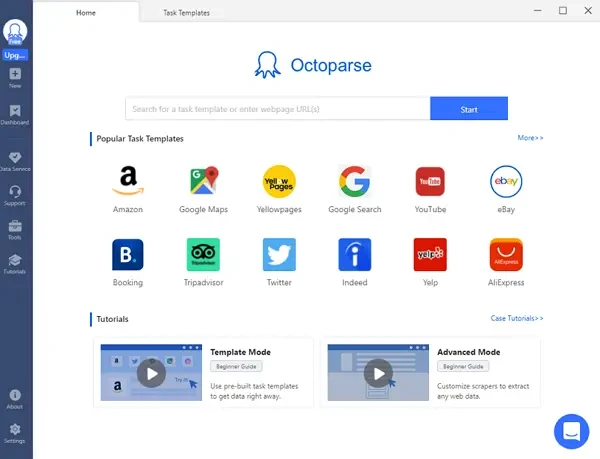
I’ve used Octoparse on ecommerce sites, directory listings, and even messy blog pages. It’s one of the few scraping tools that doesn’t scare beginners away after five minutes.
This article answers what people really want to know — not just what the homepage claims.
What Is Octoparse Used For?
Octoparse is a visual web scraping tool that lets you collect data from websites without writing code.
People use it for:
- Product prices and stock tracking
- Business leads and contact lists
- Job postings and real estate data
- Market research and competitor checks
Instead of typing scripts, you click elements on a webpage. Octoparse figures out the pattern and builds the extraction logic for you.
How Octoparse Works (Simple Explanation)
Octoparse opens a built-in browser. You visit a page, click the data you want, and confirm the selection.
Behind the scenes, it:
- Detects repeating patterns
- Handles pagination
- Loads dynamic content
- Exports data to CSV, Excel, or Google Sheets
For most sites, auto-detection does the heavy lifting. When it fails, manual selection still works fine.
What’s New in Octoparse 8.8.0
Version 8.8.0 focuses on stability and accuracy rather than flashy changes.
From hands-on use, the noticeable updates include:
- Better handling of JavaScript-loaded pages
- Faster workflow loading
- Improved cloud extraction reliability
- Fewer crashes during long tasks
- Cleaner task editor layout
If you’ve used older 8.x builds, this one feels smoother, especially on large sites.
Octoparse Free vs Paid: What You Actually Get
This is where most users get confused.
Free Plan
- Local extraction only
- Limited task runs
- Slower speed
- Good for testing and small projects
Paid Plans
- Cloud extraction
- Scheduled tasks
- Proxy support
- Higher page limits
- Faster processing
If you’re scraping more than a few hundred pages, the free plan hits a wall fast. For learning and quick jobs, it’s fine.
Local Extraction vs Cloud Extraction (Real Difference)
Local extraction runs on your own computer. Close your laptop, and it stops.
Cloud extraction runs on Octoparse servers. You can shut down your PC and still get results.
From experience:
- Local is better for debugging
- Cloud is better for scale
- Cloud avoids many IP blocks
This alone is a strong reason many users upgrade.
Can Octoparse Handle Login Pages and Dynamic Sites?
Yes, and this surprises many beginners.
You can:
- Record login steps once
- Save cookies and sessions
- Load infinite scroll pages
- Extract pop-up content
I’ve scraped dashboards and member-only pages without issues, as long as the site doesn’t aggressively block bots.
Common Problems Users Face (And Fixes)
Scraping stops mid-way
Usually IP-related. Add proxies or switch to cloud mode.
Wrong data captured
Auto-detection guessed wrong. Manually reselect items.
Site blocks extraction
Lower speed, enable delays, or rotate IPs.
These aren’t Octoparse bugs — they’re normal scraping limits.
Is Octoparse Safe and Legal?
Octoparse itself is safe software.
Legality depends on:
- Website terms
- Data type collected
- How you use the data
Public data is generally fine. Login-only or personal data needs caution.
Who Should Use Octoparse 8.8.0?
Octoparse works best for:
- Beginners with zero coding background
- Marketers and SEO teams
- Ecommerce sellers
- Researchers and analysts
If you want full control with scripts, Python tools may suit you more. If you want speed and simplicity, Octoparse wins.
Final Thoughts From Real Use
Octoparse 8.8.0 doesn’t try to impress with buzzwords. It focuses on making scraping less painful.
It won’t replace custom code for advanced users. But for most people, it saves hours every week — and that’s the real value.
1. Can Octoparse scrape websites with login pages?
Yes, Octoparse can handle login-based websites using its built-in browser and auto-login settings. You simply record the login once, and it repeats the session during extraction.
2. Why does Octoparse stop scraping after some pages?
This usually happens due to website limits, IP blocking, or free-plan restrictions. Switching to cloud extraction or adding proxies often fixes it.
3. Is Octoparse safe to use in 2026?
Yes. Octoparse works inside your browser environment and doesn’t inject harmful scripts. The risk depends more on how websites react to scraping, not the software itself.
4. What’s new in Octoparse 8.8.0 compared to older versions?
Version 8.8.0 improves auto-detection accuracy, cloud stability, and workflow speed, especially on JavaScript-heavy sites.
5. Can beginners really use Octoparse without coding?
Yes. Most users never touch code. Point-and-click workflows cover around 90% of common scraping tasks.