If you searched for iZotope Vinyl 1.13.0, you’re likely checking one thing.
Is this still worth using, and does it hold up today?
Short answer: yes.
Long answer: it’s one of those plugins that sticks around because it does one job well and doesn’t get in your way.
What Is iZotope Vinyl?
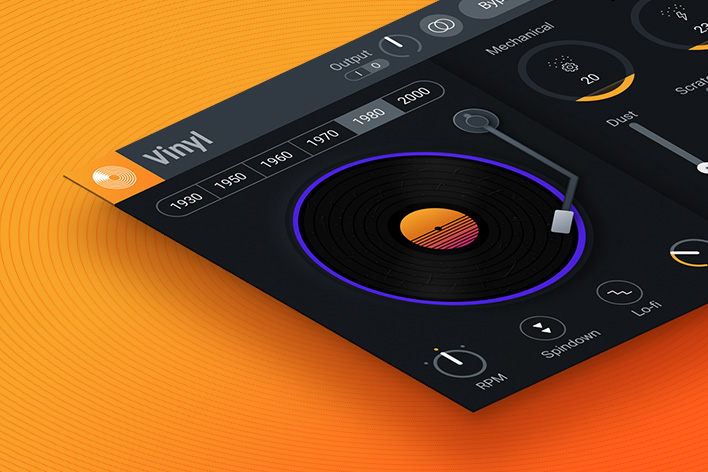
iZotope Vinyl is a free audio plugin that adds old-record character to your sound. You don’t get presets designed to impress. You get controls that let you shape dust, noise, pitch movement, and wear in a simple way.
Version 1.13.0 is the latest release and focuses on better system support rather than changing how it sounds.
What Changed in Version 1.13.0?
From daily use, this update fixed more than it added.
Users on Windows noticed:
- Better scaling on high-resolution screens
- Fewer blurry controls
- More stable behavior in newer DAWs
If you tried Vinyl years ago and stopped using it because it felt dated, this version feels smoother and cleaner to work with.
How iZotope Vinyl Feels in Real Use
Here’s the honest experience.
You drop it on a track.
You move one knob.
The sound changes instantly.
That’s why people keep it installed.
I often use it early in a session when a loop feels too clean. A little dust, a slow pitch wobble, and suddenly the track feels lived-in. I don’t automate much. I don’t stack plugins. Vinyl handles that first layer of character.
Competitor articles usually list features but skip this part. The speed matters.
iZotope Vinyl 1.13.0 Features Explained Simply
Year Control
This changes the sound style. Older years sound rougher. Newer years sound cleaner.
Dust and Scratch
Dust adds constant noise. Scratches add random movement. I keep scratches low most of the time.
Warp Depth
This creates pitch movement. Great for lo-fi chords and pads. Too much can sound seasick.
Mechanical Noise
Subtle hum and movement. Works well on intros.
Mono Button
Old records weren’t wide. This helps tighten things up fast.
iZotope Vinyl for Lo-Fi Music
This is where it shines.
On lo-fi beats, Vinyl saves time. Instead of stacking noise plugins, pitch effects, and EQ, you get a usable sound in seconds.
I often put it before compression. That way, the noise feels glued into the track instead of floating on top.
Common Problems and Real Fixes
iZotope Vinyl Not Showing in DAW
- Check VST3 folder
- Rescan plugins
- Restart the DAW after install
UI Looks Too Small or Blurry
Version 1.13.0 fixes most scaling issues. Update if you’re on an older build.
Too Much Noise in Mix
Back off the dust knob and automate bypass during louder sections.
Using iZotope Vinyl on Vocals
Yes, it works.
I use it on background vocals, intros, and spoken parts. Keep everything low. You want texture, not distraction.
Is iZotope Vinyl Still Worth Using?
If you want fast character without thinking too hard, yes.
If you need deep control and modern textures, paid plugins go further. Vinyl isn’t trying to replace them. It fills a simple role and does it well.
Personal Take After Years of Use
I’ve deleted many free plugins. Vinyl always stays.
It opens fast. It sounds familiar. It doesn’t fight you.
That’s why version 1.13.0 still earns a spot in my plugin folder.
Q1: Is iZotope Vinyl 1.13.0 completely free?
Yes. iZotope Vinyl is 100% free with no trial limits.
Q2: Why doesn’t iZotope Vinyl show up in my DAW?
Most cases come from plugin scan paths or missing VST3 support.
Q3: Does iZotope Vinyl work on Windows 11?
Yes. Version 1.13.0 added better support for newer Windows systems.
Q4: Can iZotope Vinyl be used on vocals?
Yes. It works well on vocals, especially for lo-fi or retro effects.
Q5: Is iZotope Vinyl good enough for professional tracks?
Yes, when used lightly. Many producers blend it rather than pushing it hard.