Protect your accounts with a free password manager: compare Bitwarden and KeePassXC and set up a strong master password.
Most people have dozens of online accounts, and far too many of them share the same password or a small variation of it. When one site is hacked, attackers try the stolen password everywhere else.
A password manager solves this problem. It creates a long, unique password for every account, stores them in an encrypted vault and fills them in when you need them. You only remember one strong master password.
This guide explains how password managers work, compares the best free options for a Windows PC and shows how to set one up safely.
Why passwords fail
Humans are bad at passwords. We choose short ones, reuse them and base them on names and dates that attackers can guess. When a service suffers a data breach, millions of passwords leak and are tested against other sites automatically.
Writing passwords on paper or in a plain text file feels safe but creates new risks. Browser autofill without protection can also expose accounts if someone uses your computer.
A password manager gives you strong, unique passwords without the memory burden.
How a password manager works
A password manager keeps your logins in an encrypted database called a vault. The vault is locked with your master password, and sometimes an extra key or a second factor.
When you visit a site, the manager fills in the saved login for the matching address. It can also generate new passwords and warn you about weak or reused ones.
Good services use zero knowledge encryption, which means that the provider cannot read your vault. Only you can unlock it.
Bitwarden
Bitwarden is one of the most popular free password managers. It is open source, offers apps for Windows, phones and browsers, and the free plan supports unlimited passwords across unlimited devices.
It supports secure notes, cards and identities, and you can generate passwords and check for breaches. Paid plans add extras such as advanced two step options and storage for files.
You can also host it yourself if you like control. For most people, the free personal plan is enough.
KeePassXC and KeePass
KeePassXC and KeePass store your passwords in a database file on your own computer. There is no company account and no cloud service unless you choose to sync the file yourself.
They are free, open source and highly regarded. You control backups and syncing, for example through a trusted cloud folder or a USB stick.
The trade off is convenience. You must handle sync and backups, and mobile access needs a compatible app.
Browser password managers
Chrome, Edge and Firefox can save and fill passwords. They are convenient and have improved in security, and they sync with your account.
The risk is that anyone who can unlock your computer or your browser profile may reach the passwords. They also tie your logins to one browser.
If you use them, protect your computer with a strong sign in, turn on device lock and use two step verification. A dedicated manager usually gives more control.
Other free options
Proton Pass offers a free plan with a focus on privacy, from a company known for encrypted email. Other managers also have free tiers with limits.
Check what the free plan includes, such as the number of devices, sharing and recovery options. Free plans may change.
Whichever you choose, read the security information on the official site, and avoid unknown managers with no clear ownership.
Choose a strong master password
Your master password protects everything, so make it long and memorable. A passphrase of four or more random words, such as a short sentence of unrelated words, is strong and easier to remember than a complex short password.
Do not reuse it anywhere else, and never share it. Write it down and keep it in a safe place until you know it by heart.
Length matters more than tricks. Fourteen characters is a good minimum, and longer is better.
Turn on two step verification
Add a second factor to your password manager and to important accounts such as email and banking. An authenticator app is stronger than text messages. A hardware security key is stronger still.
Passkeys, which replace passwords with cryptographic keys stored on your device, are becoming common and are worth using where available.
Save the recovery codes in a safe place. Without them, losing your phone could lock you out.
Set up Bitwarden step by step
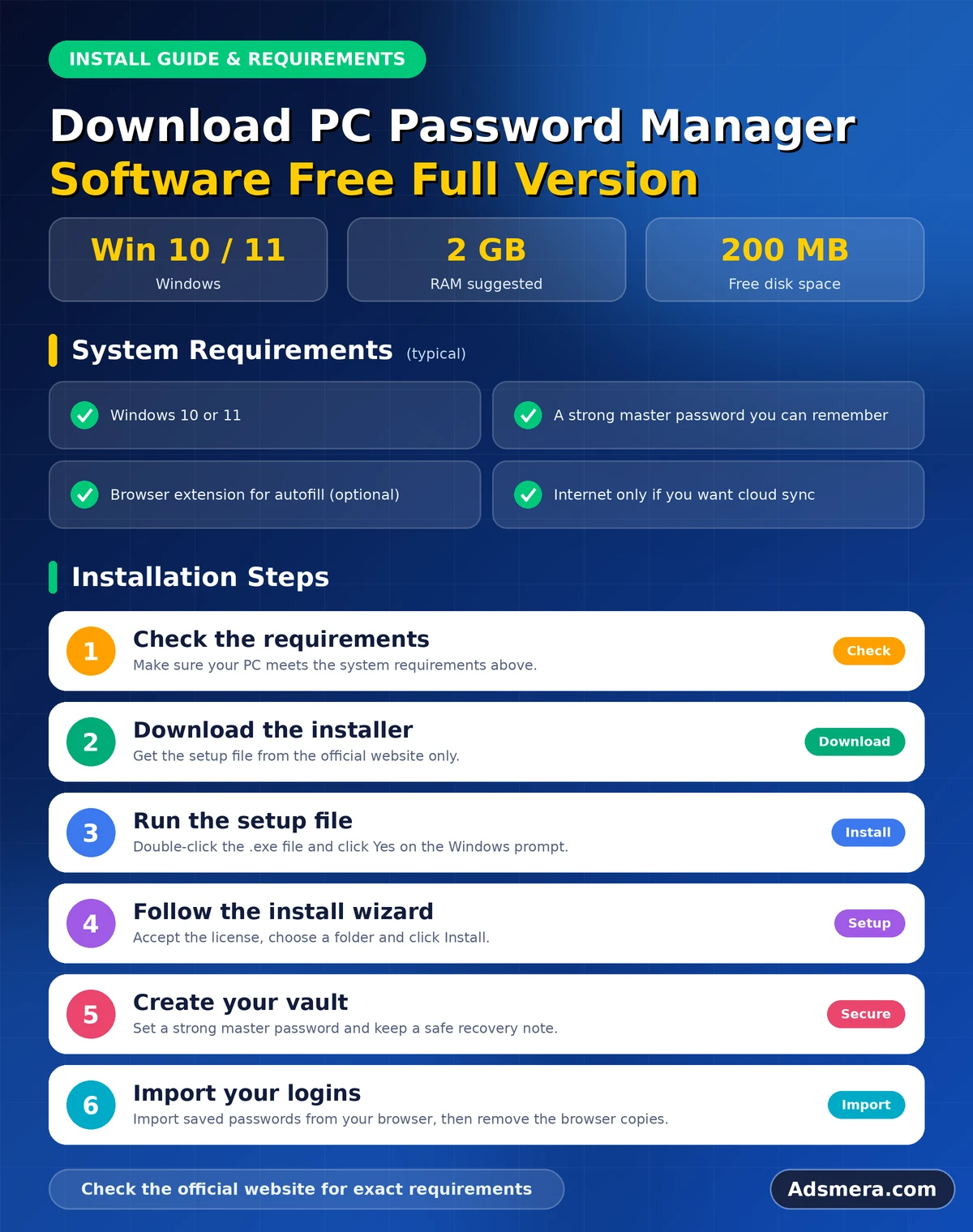
Download Bitwarden from the official website and create an account with a strong master password. Install the browser extension, sign in and open the vault.
Add your most important accounts first, such as email and banking. Use the password generator to replace weak or reused passwords. Install the mobile app and sign in there too.
Turn on two step verification and export an encrypted backup of your vault from time to time.
Import your existing passwords
Most managers can import passwords from browsers and other managers. Export a file from your browser, then use the import function in the manager.
The exported file contains your passwords in plain text, so delete it securely as soon as the import finishes. Then remove saved passwords from the browser and turn off its built in saving.
After importing, go through the list and replace the weakest and oldest passwords first.
Generate unique passwords
Let the manager create random passwords of at least sixteen characters for most accounts. You do not need to remember them, so make them long.
Some sites limit length or characters, so adjust the generator settings. For important accounts, change passwords one by one rather than all at once.
Keep a note of which accounts you have updated until the process is complete.
Secure notes and documents
A manager can store more than passwords. Use secure notes for recovery codes, software licence keys, Wi Fi passwords and answers to security questions.
Do not keep scans of identity papers in a vault unless you trust its encryption and have a backup. Our guide to free note taking software for PC explains why other notes should live in a different place.
Treat the vault as a safe, not as a general storage box.
Autofill and phishing
Phishing sites copy real login pages. A good manager fills your login only on the exact address saved with it. If it does not offer to fill, stop and check the address.
Never type a stored password into a page because it looks right. Be careful with links in emails and messages, and open important sites yourself.
Autofill therefore adds protection against fake pages as well as convenience.
Breach monitoring
Many managers warn you when a saved site has been part of a data breach. You can also check addresses on the Have I Been Pwned website, a trusted service that tracks leaks.
If a breach affects an account, change the password at once and look for other places where you used it. Turn on two step verification there.
Do not panic. Breaches are common, and unique passwords limit the damage.
Family sharing and emergencies
Families often share streaming accounts or utility logins. Use the sharing features of the manager, not messages and notes.
Consider what happens if you are unavailable. Some managers offer emergency access that lets a trusted person request access after a waiting period. Or keep a sealed note with instructions in a safe place.
Plan this once, and review it when your situation changes.
Back up your vault
Even cloud based managers benefit from a backup. Export an encrypted copy of your vault, and keep it with your other important files.
Our guide to free PC backup software shows how to include it in an automatic backup.
Test that you can open the backup and that the master password works.
Free versus full version
Password managers do not need cracked or pirated full versions. The free plans of reputable products already provide the important features.
Paid plans add convenience, such as larger storage and family plans. Pay if you need them, and support the developers.
Never download a modified installer from an unknown website. A hacked password manager is a disaster.
Common mistakes
A few errors weaken the protection of any manager.
- Choosing a weak master password.
- Skipping two step verification.
- Keeping the exported import file on the computer.
- Ignoring breach warnings.
- Forgetting to back up the vault.
Avoid them, and your passwords will be safer than those of most people. Our guide to free PC firewall software adds a further layer of protection.
A first week plan
Setting up a manager feels big, so spread it over a week. On day one, install it and add your email and banking accounts. On day two, turn on two step verification for the manager and for your email.
On the following days, change passwords for social media, shopping and work accounts, a few at a time. At the end of the week, import the rest, remove passwords from your browser and review the weak password report. Small steps are easier than one exhausting evening.
Use it on your phone and in your browser
A manager is only useful if it is with you. Install the browser extension on every browser you use, and the app on your phone. Turn on biometric unlock on your phone for convenience, but keep a strong master password as the main key.
Practise logging in to an app using the manager's autofill. If something does not fill, copy the password from the app instead of typing a simple version. A few minutes of practice makes the habit natural.
Protect the devices that hold your vault
A vault is only as safe as the devices that unlock it. Keep Windows and your browser updated, use a strong sign in and lock the screen when you leave. Do not install unknown extensions in the browser where your manager lives.
Run regular scans with Microsoft Defender, and avoid entering your master password on shared computers. If you lose a device, change your master password and log out of other sessions from the manager's website.
Help family members get started
Passwords protect everyone in the family, not just the person who set up the manager. Sit with parents or relatives and set it up together. Choose a master password they can remember, write it down and store it safely.
Start with their email account, because anyone who controls email can reset other passwords. Show them how autofill works, how to spot fake login pages and why they should never share codes. Patient help once saves many future problems.
Review your vault once a year
Set a yearly reminder to clean your vault. Delete accounts you no longer use, update old passwords, check that two step verification is still active and confirm that your emergency plan is current. Also update the master password if you ever typed it on a shared computer. A yearly review keeps a good system from slowly decaying.
Print a one page emergency sheet
Write down where the vault is stored, which email account recovers it, where the recovery codes are kept and who should be told if something happens to you. Keep the sheet with your important papers, not on the computer. When stress arrives, a clear sheet saves a great deal of time.
Keep reading in this series
This guide belongs to our free PC software series. For the big picture, start with the complete guide to the best free PC software for Windows 11.
These related guides continue the topic:
- free antivirus software for Windows 10: protection options and settings after Windows 10 support ended.
- free PC firewall software: use the Windows firewall and free add ons properly.
- free remote desktop software for PC: connect to another computer securely.
Final thoughts
A password manager is one of the best security upgrades you can make, and the free options are excellent. Bitwarden is a strong all rounder, KeePassXC suits people who prefer local files and browser managers are a decent starting point.
Choose a long master password, turn on two step verification, replace weak passwords gradually and keep a backup. Do these things, and a leaked password will no longer threaten your other accounts.
FAQ
What is the best free PC password manager?
Bitwarden is a popular free choice with apps for all devices. KeePassXC is excellent if you prefer to keep your vault in a local file.
Is it safe to store all my passwords in one place?
Yes, if the vault is encrypted, protected by a long master password and two step verification. Unique passwords are far safer than reusing the same one.
Are browser password managers good enough?
They are better than reusing passwords, but a dedicated manager gives more control and works across browsers.
What happens if I forget my master password?
Most managers cannot recover it for you. Keep a written copy in a safe place and set up any recovery options offered.
Do I need to pay for a full version?
No. Free plans of reputable managers cover the essentials. Never download cracked versions.
password, manager, software, free, full, version