If you searched for Miracle Thunder 3.40, chances are you’re either fixing phones or learning mobile software repair. I remember my first time opening Miracle Thunder — half the buttons looked confusing, and the rest didn’t work until I figured out what the tool actually wanted from my system.
This article clears that confusion.
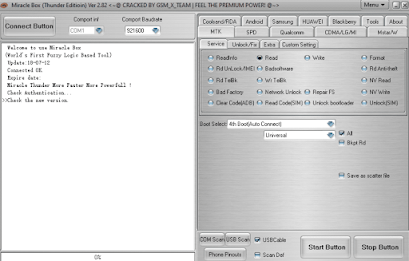
Miracle Thunder version 3.40 is the latest publicly available release used in mobile servicing for tasks like flashing firmware, removing FRP locks, repairing software faults, and handling basic Android phone fixes. It’s widely used in local repair shops, especially where quick turnaround matters more than fancy interfaces.
What Miracle Thunder Actually Does in Real Life
Miracle Thunder isn’t just a “flash tool.” In daily shop work, it’s often used for:
- Flashing stock firmware
- Removing FRP on supported devices
- Fixing stuck boot logos
- Resetting user locks on older phones
- Reading basic phone information
I’ve seen technicians use it mostly on older Android models that customers still bring in daily. It’s not designed for the newest security levels, and that’s something many websites forget to mention.
What’s New in Miracle Thunder 3.40
Version 3.40 didn’t bring flashy design changes. Instead, it focused on stability and wider model handling.
From hands-on use and community feedback, users noticed:
- Better performance on Windows 10 and 11
- Fewer random crashes during flashing
- Slight improvements in device detection
- Cleaner handling of older MTK-based phones
If you’re upgrading from a much older build, the difference feels noticeable, especially during long flashing sessions.
Installation Experience (Real-World)
Installing Miracle Thunder isn’t hard, but skipping steps causes most problems.
Here’s what usually works:
- Disable antivirus before installation
- Install required USB drivers
- Run setup as administrator
- Avoid installing on the system drive if possible
I’ve seen many “not opening” complaints vanish once users stop installing it inside protected Windows folders.
Common Problems Users Face (And Why)
Miracle Thunder not opening
This usually comes from antivirus blocking files or missing system libraries.
Login problems
Often linked to unstable internet or blocked server connections.
Loader errors
Happen when phone drivers don’t match the selected chipset.
Device not detected
Almost always a driver issue, not a tool bug.
These issues show up again and again on forums, yet most sites never explain why they happen.
Supported Devices — What to Expect
Miracle Thunder supports:
- Many MTK-based Android phones
- Older Qualcomm models
- Feature phones used in local markets
It’s not meant for brand-new flagships. Many technicians still keep it installed because customers don’t always bring the latest phones.
Is Miracle Thunder Still Worth Using?
If you’re running a small repair shop or learning GSM software work, yes. It’s simple once you understand its limits.
If you expect one-click fixes for the latest security patches, you’ll be disappointed. That’s where experience matters more than tools.
From my side, it’s one of those utilities you don’t use every day, but when you need it, you’re glad it’s there.
Q1: What is Miracle Thunder used for?
Answer: Miracle Thunder is used for flashing, unlocking, FRP removal, IMEI repair, and software fixing on Android phones.
You’ll see this question a lot from beginners who confuse it with Miracle Box. Thunder works as a software-based servicing tool and supports many Android chipsets used in daily repair shops.
Q2: Why does Miracle Thunder ask for login every time?
Answer: Miracle Thunder requires an active account or server connection, and login prompts usually appear when the tool can’t validate saved credentials.
This often happens after system updates, antivirus blocks, or missing support files.
Q3: Miracle Thunder not opening on Windows — what’s the fix?
Answer: Most of the time, it’s blocked by antivirus or missing Visual C++ and drivers.
Disabling real-time protection during installation and running the tool as administrator usually fixes it.
Q4: Does Miracle Thunder 3.40 support new Android phones?
Answer: It supports many older and mid-range models, but not the newest security-patched devices.
For recent phones, technicians often pair it with other tools instead of relying on it alone.
Q5: Is Miracle Thunder free or paid?
Answer: Miracle Thunder itself installs freely, but many features require server access or authorization.
That’s why some options stay greyed out for certain users.
Leave a Reply